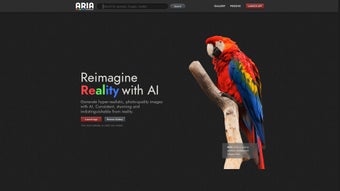

Download Aria ML – AI‑Powered Art Generator, Hyper‑Realistic Design Tool
Overview & Introduction
Aria ML is a cutting‑edge, web‑based AI art generator that transforms simple textual prompts into stunning, hyper‑realistic images. Designed for a broad audience—from freelance illustrators and marketing agencies to game developers and hobbyist creators—the platform blends an intuitive, drag‑free interface with powerful deep‑learning models that understand composition, lighting, texture, and style. By handling all heavy computation on secure cloud servers, Aria ML eliminates the need for expensive GPUs or local installations, making high‑quality generation accessible on virtually any device with a modern browser.
The subscription model grants unlimited renders, regular AI model upgrades, and priority support, positioning the tool as a long‑term partner for anyone who needs to produce visual content quickly without sacrificing artistic control. Whether you are crafting a concept art piece, generating social‑media graphics, or producing print‑ready posters, Aria ML delivers pixel‑perfect results in seconds. Its collaborative workspace, built‑in template library, and API access further extend its usefulness across teams and pipelines, ensuring that creativity can flow uninterrupted from idea to final asset.
In the following sections, we’ll explore the standout features, walk through the simple onboarding process, discuss system compatibility, and weigh the pros and cons to help you decide if Aria ML fits your workflow.
Key Features That Differentiate Aria ML
- Prompt‑Driven Generation: Type natural‑language descriptions—such as “misty forest at dawn with soft golden light”—and watch the AI render a detailed scene that respects depth, perspective, and mood.
- Extensive Style Library: Choose from more than 150 curated styles, ranging from classic oil and watercolor to cinematic lighting, ultra‑realistic 3D renders, and modern pixel art.
- High‑Resolution Export: Export creations up to 8 K resolution in PNG, JPEG, or TIFF formats, suitable for large‑format prints, billboards, or high‑detail digital assets.
- Layered Editing Post‑Render: After generation, manipulate individual layers (background, subject, lighting) without re‑running the entire model, giving you granular control over the final look.
- Collaboration Hub: Share projects with teammates, leave inline comments, lock versions for client approvals, and track changes with an automatic version history.
- Secure Cloud Rendering: All processing occurs on encrypted servers (TLS 1.3), ensuring data privacy and compliance with GDPR and CCPA regulations.
- Continuous Model Updates: Monthly AI upgrades introduce new artistic techniques, reduce common artifacts, and expand the creative vocabulary of the engine.
- RESTful API Access: Integrate Aria ML’s generation capabilities directly into design tools like Photoshop, Figma, or custom pipelines, automating bulk image creation.
These features collectively make Aria ML not just a generator but a comprehensive creative platform. The ability to fine‑tune prompts, switch styles on the fly, and edit layers after rendering eliminates the need for additional raster‑editing software in many cases. Moreover, the collaboration tools turn the traditionally solitary process of AI‑assisted art into a team‑centric workflow, accelerating feedback loops and reducing revision cycles. The frequent model updates ensure that users always have access to the latest advancements in AI artistry, keeping the tool relevant as the technology evolves.
Installation, Usage, Compatibility, and Pros & Cons
Because Aria ML is delivered entirely through the browser, there is no traditional installation step. To begin, visit ariaml.com, create a free account, and select a subscription tier that matches your rendering needs. After email verification, you are taken to a clean dashboard where the main canvas resides.
Step‑by‑step usage guide:
- Enter a descriptive prompt in the “Idea Box” (e.g., “futuristic skyline at night with neon reflections”).
- Select a style preset or customize parameters such as color palette, depth of field, and lighting temperature.
- Click “Generate” and watch the AI compose the artwork in real time (average render time: 12‑30 seconds).
- Use the side panel to tweak layers, add text overlays, or swap background elements without re‑rendering the entire image.
- When satisfied, export the image in PNG, JPEG, or TIFF format, choosing the required resolution.
Supported Platforms: Aria ML runs on any modern browser (Chrome, Edge, Firefox, Safari) across Windows 10/11, macOS 12+, Linux distributions, as well as mobile browsers on Android 9+ and iOS 14+. The responsive UI adapts to tablets and smartphones, though full‑resolution exports are best performed on a desktop for optimal performance.
Pros
- Hyper‑realistic outputs that often require little to no post‑processing.
- Natural‑language prompts make the tool accessible to non‑technical users.
- High‑resolution export options suitable for both web and print media.
- Robust collaboration features streamline client feedback and team workflows.
- Continuous AI model upgrades keep the service at the forefront of technology.
- Secure, GDPR‑compliant cloud processing protects proprietary concepts.
- API integration enables automation within existing design pipelines.
Cons
- Subscription pricing may be a barrier for hobbyists or occasional users.
- Requires a stable internet connection; offline generation is not supported.
- Complex prompts can occasionally produce unexpected compositional quirks that need manual adjustment.
- Limited free trial (20 renders) may not be enough to fully evaluate the platform for large projects.
- Exporting very large files (8 K) can be slower on low‑end devices due to bandwidth constraints.
Overall, the advantages of speed, quality, and collaborative capabilities outweigh the drawbacks for professional creators, while the subscription cost remains the primary consideration for casual users.
Frequently Asked Questions & Conclusion
FAQ
Can I use the generated images for commercial projects?
Yes. All images created under a paid subscription come with a full commercial license, allowing you to sell, distribute, or incorporate them into marketing materials without additional fees.
Is there a free trial or demo version?
Aria ML offers a 7‑day free trial with 20 limited renders, giving prospective users a chance to explore the interface and evaluate output quality before committing.
How secure is my data and my prompts?
All data is encrypted in transit (TLS 1.3) and at rest. Aria ML adheres to GDPR and CCPA standards, and prompts are not stored permanently unless you save the project.
Can I integrate Aria ML into my existing design pipeline?
Yes. The platform provides a RESTful API with authentication tokens, allowing you to automate image generation from within Adobe Photoshop, Figma, or custom scripts.
What happens if I exceed my render quota?
For subscription tiers with limited renders, excess requests are queued and processed once the quota refreshes. You can also purchase additional render packs on‑demand.
Conclusion & Call to Action
Aria ML stands out as a powerful, cloud‑based AI art generator that delivers professional‑grade visuals with remarkable speed and flexibility. The subscription model, while representing an ongoing cost, provides unlimited renders, commercial usage rights, and continuous AI improvements that together deliver strong ROI for agencies, studios, and freelancers alike. Its extensive style library, layered post‑render editing, and seamless collaboration tools make it a versatile addition to any creative workflow. If you’re ready to boost your design productivity and explore the frontier of AI‑driven artistry, sign up for the free trial today and experience hyper‑realistic generation at your fingertips.



.png)



